MiniMax Video Generation
Tried MiniMax by Hailuo AI and had a blast. From animating Midjourney images to testing camera movements, the results were surprisingly good. Free daily credits, solid motion, and easy scene continuation make it a strong AI video tool.
tl;dr
- MiniMax by Hailuo AI offers AI-powered image-to-video and text-to-video generation, with a focus on character consistency and convenient camera movements
- You’ll get 1000 free credits at signup (≈ 33 videos), then 100 free credits per day
- Great consistency, fun to experiment with, and solid results
What is MiniMax by Hailuo AI?
MiniMax is a player in the AI video space, offering both text-to-video and image-to-video generation. It’s a great tool if you want to generate videos with better motion dynamics compared to some of the competition.
One standout feature? T2V-01-Director – their model that allows for precise camera movements. If you want to simulate cinematic shots, this is a game-changer.
Also thanks to their image consistency you can use the image-to-video creator to get a longer video. More on that later.
Good to know: First you sign up you get 1000 credits to blast through, which is enough for 33 videos. After that you get 100 free credits per day that you log in. A Video takes 30 credits to generate – if you forgot about something you can cancel and get the credits back. Easy. Let’s go!
First Steps
Before doing anything, I read their Notion documentation – so you don’t have to (but honestly, it’s worth a skim).
They suggest two main prompt structures:
- Basic Prompt Formula = Main Subject + Scene + Motion
- Precise Prompt Formula = Main Subject + Scene + Motion + Camera Movement + Aesthetic Atmosphere
Pretty straightforward, but one thing that stands out from their examples is that clarity in prompts really makes a difference. One thing becomes clear from their examples: More details = better results. If you half-ass the prompt, the AI will half-ass the video. Simple as that.
My Exploration
I had a few things I wanted to test, so I broke them into categories:
- Aesthetic: Realistic, 3D, Illustration, Motion Design
- Subject: Human (and emotion), Animal, Landscape
- Camera Details: Camera Movement, Close-Up, Fish Eye Lens
- Technical: Image-to-Video, Reference Character, Scene Continuation
Let’s see what we can do with our free generations.
First Try: Alien Planet – Abstract but Photorealistic
A good way to kick things off: a weird, otherworldly landscape.
First attempt? Looked a bit off – either my parameters were wrong, or the AI was just having a creative moment. Also, when using an image reference, it did not recognise my planet and added another. A green glowing planet? It’s REALLY gonna be green. Tweaked, tested, moved on before burning through all my credits.
Left: The camera begins super wide angle shot through the window of a spaceship. We can see a foreign green glowing alien planet with three moons ahead. The camera moves straight through the window and zooms in closer to the planet. The planet radiants bright green light, while the moons are more somber. The camera starts descending, breaking through the first atmospheric layer of the planet. Aesthetic of a animal documentary, serious but friendly tone. | Right: The camera begins super wide angle shot of space. We can see a foreign alien planet with two moons ahead. The camera zooms in closer to the planet. The planet radiants bright green light, while the moons are more somber. The camera starts descending, breaking through the first atmospheric layer of the planet. Aesthetic of a animal documentary, serious but friendly tone.
Second Try: Human Emotion – Shocked Astronaut
Next up: A human subject showing emotion. Sticking to the sci-fi theme, I went with a shocked astronaut. The AI nailed the expression – he definitely looked upset. But was there a single tear running down his face for dramatic effect? Nope. Maybe next time.
Prompt: close-up of of a shocked astronaut. He widens his eyes and a single tear rolls down his cheek, while the camera slowly zooms in. He seems hopeless, lost, lonely. Somber atmosphere.
Third Try: Stop Motion Illustration – A Fun Disaster
Okay, up to this point, this was the biggest challenge. AI and stop-motion don’t always mix well, but I love the aesthetic, so I had to try. Verdict? It’s not usable, but damn, it made me smile. The AI did a solid job analysing the image, breaking it down into its elements, then adding motion. If nothing else, it was fun.
Prompt: Stop Motion animation of a Childrens drawing, with a wanna be astronaut and his rocket and a green planet. The figure waves the rocket goodbye, as the rocket flies of to the top right corner, slowly getting smaller and in the end landing on the planet, the stars are flickering around.
Fourth Try: Image-to-Video – Midjourney Animation Test
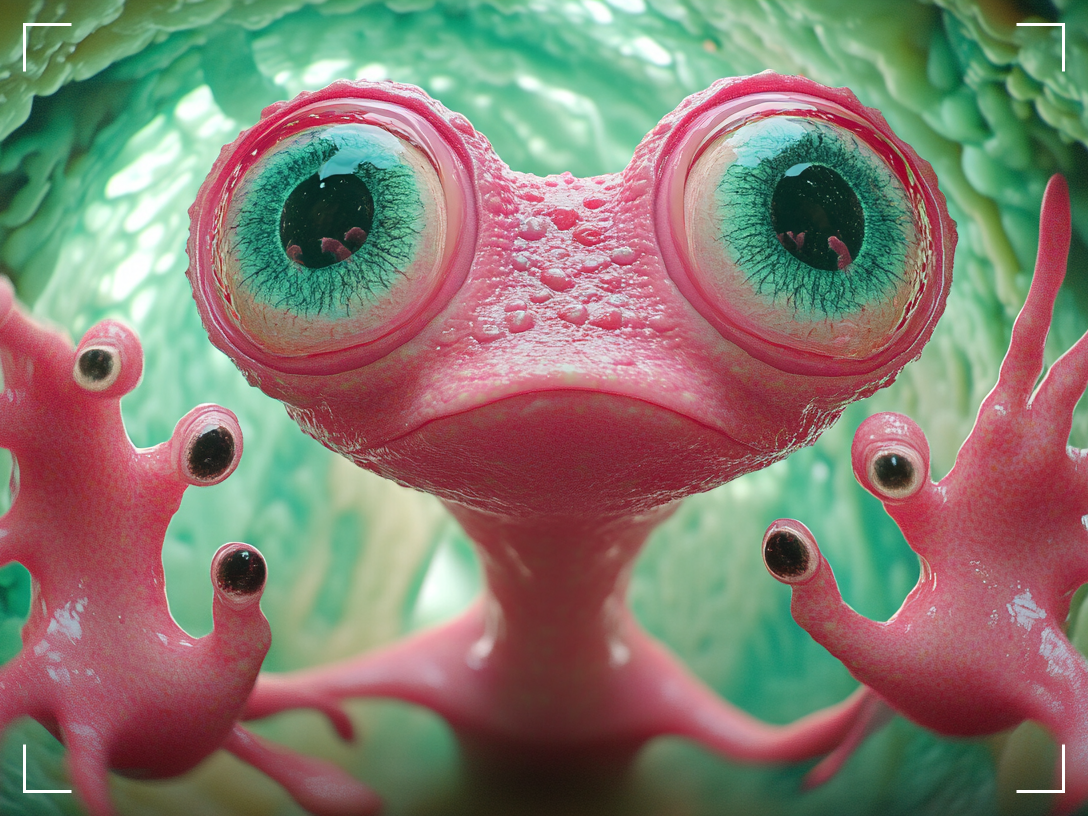
I wanted to see how well MiniMax could animate a creature. so I used a Midjourney creation as a reference. I also opted to write shorter video prompts.
First try and I absolutely loved it. To be honest I think I’ve found my new calling, animating existing Midjourney generations with MiniMax AI Video generator. This is really fun and the outcomes make sense. The motion blur, depth of field, and natural movement made it look like the creature was caught in action.
Compared to this, the second prompt really falls short. Here I decided to leave out the image reference. Maybe I am just not very good (hopefully yet) with prompting videos. Clearly, reference images make a massive difference.
Left: Pink alien fumbling around with his fingers, trying to grab the camera lens, fish-eye look, camera zooms out | Right: fish eye Camera, filming a 3D abstract pink alien creature with twenty frog eyes and stickly fingers, in a selfie style, while he is fumbling around and tries to grab the camera lens. the background green glowing gummy forest and the camera zooms out [Pull out,Zoom out]
Fifth Try: Alien Plant Life – Testing their Camera Presets
We got a human, a living alien creature, let’s talk plants. Sticking with the Midjourney animation experiment, I tried a plant scene and added a flying alien that wasn’t in the original image. I also decided to add one of their movements with the camera panning. Except for the sky loosing its color, the results are awesome. The tentacles feel very alive, moving more as the alien moves closer and the camera movement adds a nice movement to the whole scene.
Prompt: Pink alien plant gently moving in the wind, with it's tentacles moving up and down, twisting. A blue alien flying by, Camera slowly pans down
Last Try: Motion Design – Can It Handle Typography?
Historically, AI sucks at generating text, so I wanted to see if MiniMax could handle motion design with typography. First try? Messy. But, I think.. we are close? So I tried with a reference again and it worked out. Although the result was not mind blowing, which could also be attributed to the provided reference image.
Left: Motion Design of the word "Alien" on white background, melting into green goo [Pedestal down,Tilt up]T2V-01-Director | Right: Motion Design of the word "Alien" on white background, melting into green goo [Pedestal down,Tilt up]
Scene Continuation – Extending Animations
I really enjoyed myself trying this out. Because I fell in love with my alien I wanted to explore Minimax's scene continuation. It is really easy to do: Take the last frame and use it to prompt again. Both shots can then be added together. And just like that, I built a full animated sequence.
First Prompt: Pink alien fumbling around with his fingers, trying to grab the camera lens, fish-eye look, camera zooms out | Second Prompt: flustered pink alien creature, looking around embarrassed and hurriedly running off
Final thoughts
MiniMax is fun, and it delivers consistently good results. The free daily credits make it one of the more generous AI video tools out there. The visuals are way more stunning if you use reference images, but that might also be my lack of experience. The Scene continuation is easy to do, and the ability to use premade camera movements, makes the whole process really easy.
The only downside is the waiting time – sometimes it tells you there’s a 20-minute queue, but in reality, it’s usually done in under two minutes. You can also have up to three videos rendering at once, which helps. Overall, this is definitely something I’ll keep using, especially for animating Midjourney images.